
What it does on your site
- Learns your site
Reads your published pages, posts and products through the WordPress REST API, not a crawler, and keeps up as you edit them.
- Shops in the chat
Finds products from a shopper's own words, shows them with a photo and price, and adds them to the WooCommerce cart in one click.
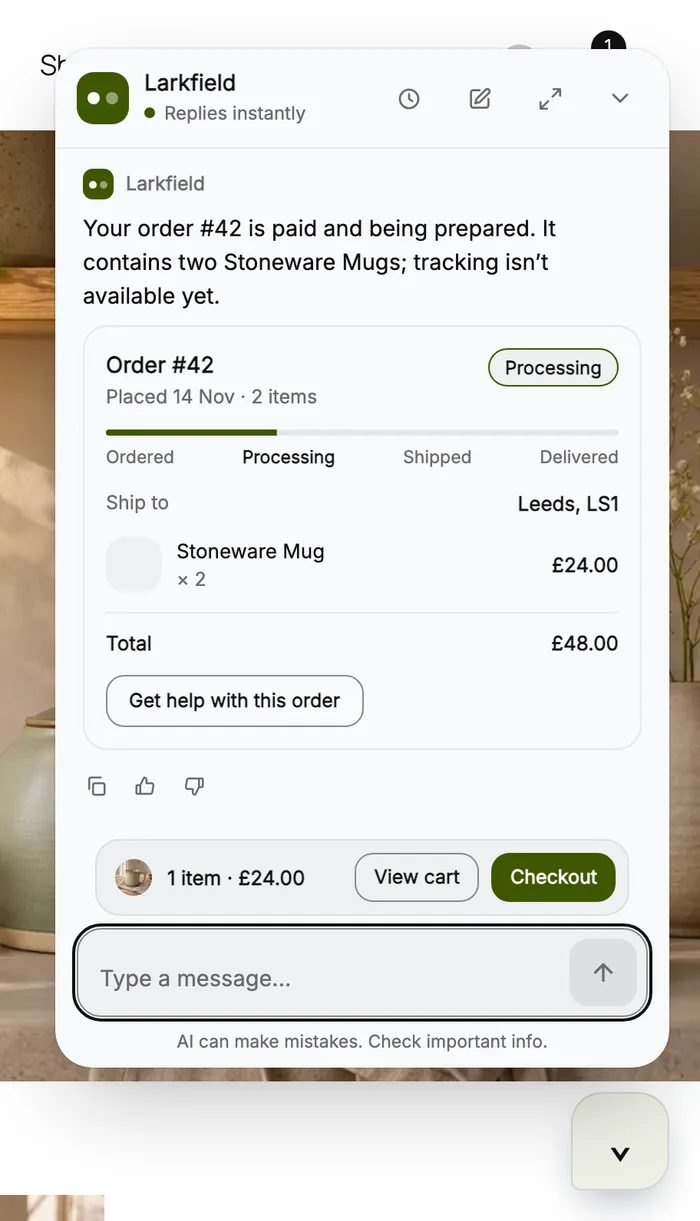
- Order status
Shows an order's status, items and tracking when the order number and billing email both match.
See it on a WooCommerce store
One chat, from question to checkout


Set it up from your WordPress admin
- Step 1Install the pluginUpload the plugin zip, or find it in the WordPress plugin directory once it's listed.
- Step 2ConnectClick Connect with ChatterMate, pick your agent and leave Teach the AI my pages and products ticked.
- Step 3Answer in the inboxSee every chat, and join any of them from ChatterMate.
It looks orders up and adds to the cart. It doesn't edit orders or issue refunds, so your team joins those chats from the inbox.
- Refunds and returns
- Changes to an order
- Damaged items

WordPress questions
Can a customer see someone else's order?
No. Your site answers only when the order number and the billing email both match, and a wrong email gets the same reply as a missing order.
What does it learn from my site?
Your published pages, posts and products, the same content any visitor sees. Cart, checkout and account pages are left out, and it reads the site again when you publish or update something.
Do I need WooCommerce?
No. On any WordPress site it answers from your pages and posts. With WooCommerce it also finds products, adds them to the cart and checks orders.
Which plans include add to cart?
Product cards and order status work on every plan. Adding to the cart from the chat is part of Growth and above.
Will it slow my site down?
The chat loads after your page, and you can set it to load on the visitor's first scroll or tap. You also choose which pages show it, and keep it off your checkout.
Is it in the WordPress plugin directory?
It is waiting for review. Until it's listed, download the plugin from GitHub and upload it under Plugins, Add New.