
Support that actually knows your business. And never sleeps.
One platform for all of support. Drop in your docs and ChatterMate answers instantly on every channel — grounded in your knowledge. It opens and investigates tickets, hands off to a human when it matters, and turns chats into qualified leads.


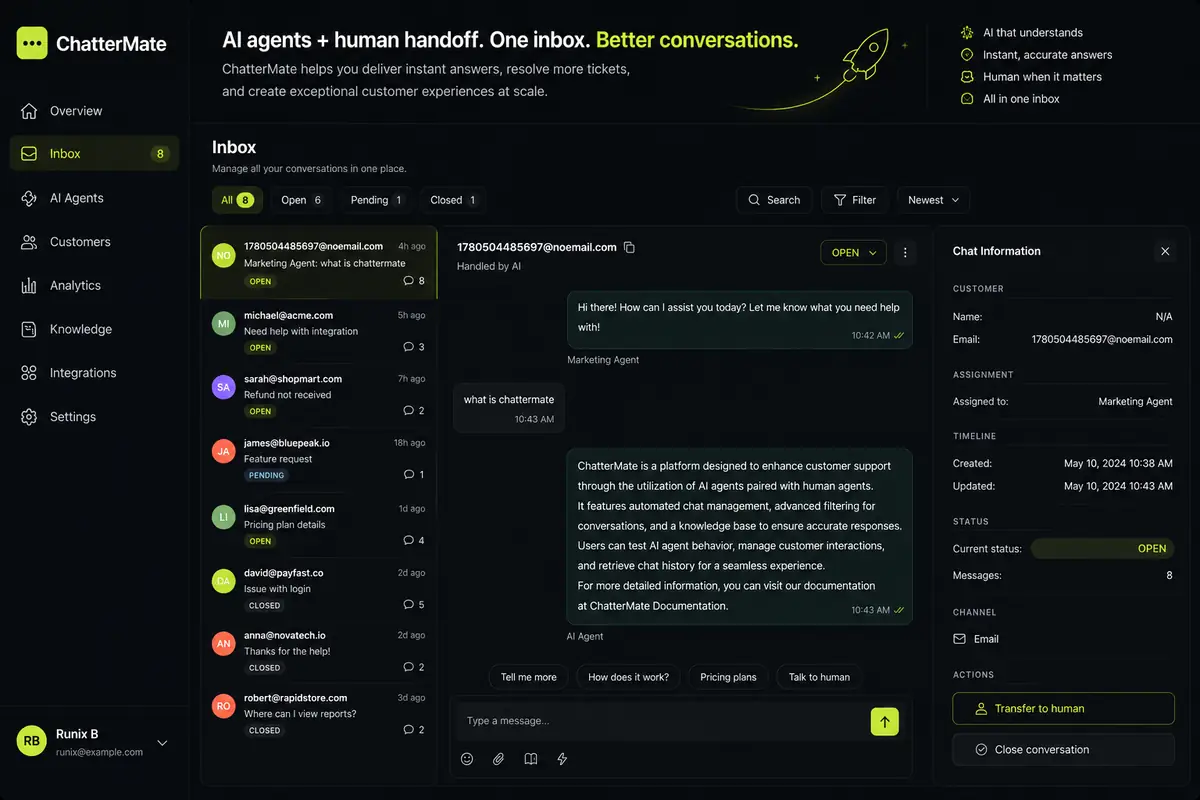
AI and your team, in one inbox.
Every conversation lands in one shared inbox — AI-handled and human-handled side by side. Filter open, pending and closed, search, reassign, and jump in whenever a chat needs a person.
- → Open, pending & closed views across every channel
- → One-click transfer to a human with full context
- → Open a Jira ticket straight from any conversation
Not just chat. Watch it work.
One agent handles chat themes, lead capture, human handover, omnichannel, FAQ, help center, Jira and Zendesk. Follow along — each capability, live.
Scans, chunks and indexes your docs and pages — then answers from them with citations. No tagging, no training data.
Name it, set its tone, and decide when it escalates or asks for feedback — all from an editable prompt.
Build multi-step flows — conditions, forms, messages, human handoff — visually. No engineers required.
Connect MCP tools so it can look up orders, issue refunds, create tickets and call your own APIs — mid-conversation.
Every conversation is pipeline.
The same agent that answers questions quietly qualifies the people asking them. It helps first, then — at the right moment — asks a few smart questions and captures the lead. No forms, no bounce.
- → Answer-first capture — asks after it’s been useful, not before
- → Qualifies on intent, then routes to sales, Slack or your CRM
- → Every visitor, lead & customer in one deduplicated profile
A help center, built from your agent’s knowledge.
The same docs that teach your agent become a fully-branded, searchable help center — auto-built, always in sync, with AI answering at the top of every search. Customers self-serve; tickets never get opened.
Refunds are issued to your original payment method within 5–7 business days. Start one from Orders → Request refund.
Script it. Self-host it. Own it.
Paste one prompt into Claude Code, Cursor or Codex and it walks you through signup, trains an agent on your site and adds the widget to your project. Or drive the CLI and MCP server yourself, and run the whole stack on your own infra.
- → One prompt sets everything up from your AI coding tool
- → One CLI for signup, agents, knowledge & workflows
- →
--jsonon every command — scriptable in CI - → MCP server + revocable access tokens for AI agents
Set up ChatterMate (AI customer support chat) for my website with its CLI.
1. Install it: pipx install chattermate-cli (or: uv tool install chattermate-cli)
2. Ask me to run this in my own terminal, not through you, so my password stays with me:
   chattermate signup --ref website-ai-prompt
   It asks for my details, a password and the code emailed to me. Wait until I say it is done.
3. Create the agent: chattermate agent create --name "Support" --type customer_support --json
4. Teach it my site: chattermate knowledge add-url --website <my website> --agent-id <agent id>
5. Run chattermate widget create --agent-id <agent id> and add the snippet it
   prints to this project's root layout, just before </body>.
Every design. Live on your site as you type.
Glass, terminal, playful, docs, ask-me-anything — pick a style and your brand color, and the widget on the right updates instantly, exactly how it’ll look embedded. Six presets ship in the box; colors, shape, typography and position are all yours.
Three steps. No engineers required.
Create your account
Sign up with email or Google and land straight in your dashboard. Free forever for your first 300 chats.
Feed it & shape it
Drop in PDFs or URLs, write the agent's personality prompt, and preview answers in real time.
Paste one line, go live
Copy the widget snippet into your site and you're live in under two minutes.
<script src="chattermate.js"></script>
Built your site with Lovable, Bolt or v0? Your dashboard gives you a ready prompt to paste.
Questions, answered.
How fast can I go live?
Under two minutes. Sign up, point it at your docs, and paste one line of code. The agent indexes your knowledge automatically.
What happens when the AI can't answer?
It detects when a customer is stuck or frustrated and hands off to your team with full context — or handles everything itself if you prefer.
Is it really open source?
Yes. The full platform is open source — inspect it, self-host it, and bring your own models. Or use the cloud and skip the ops.
Support that's always on.
Free for your first 300 chats. Open source forever. Live in minutes.